Your app gave a user a wrong answer yesterday. You open the logs and find an HTTP 200 from your LLM provider, a latency number, and nothing else. Which prompt was sent? What context was retrieved? Which model version answered? Did the agent call a tool first, and what did it return?
With a normal service you'd read a stack trace. With an LLM there isn't one. The call "succeeded" and the output was still wrong.
That's the gap traceability fills.
Why LLM Calls Need Tracing
Traditional observability assumes that the same input gives the same output, and that failures throw errors. LLM apps break both assumptions.
Failures are silent. A hallucination, a truncated answer, or a refusal all return a 200. Without the prompt and response attached to the request, you can't tell a good call from a bad one.
Behavior is non-deterministic. You can't replay a bug by re-running it. You need the exact inputs from the moment it happened: prompt, parameters, model version, retrieved context.
Agents are multi-step. One user request can fan out into several LLM calls, tool calls, retrievals and retries. When the final answer is wrong, the cause is usually one step in the middle. A trace shows the whole tree.
Cost and latency hide in the details. Token usage drives your bill. One verbose prompt template or a retry loop can double it. You only find it if tokens and cost are recorded per call and rolled up by feature.
Quality changes with every edit. Change a prompt or swap a model and quality shifts. If traces carry the prompt version and eval scores, you can tie a regression to a specific change.
Compliance asks questions. Who changed the prompt? Did customer data go to a third-party model? You need an audit trail that doesn't itself leak that data.
Why Use OpenTelemetry for Traceability?
You could log prompts to a file, or use the SDK that ships with an LLM tool. So why OTel?
One standard, many backends. Instrument once and send the data to Phoenix, Langfuse, Jaeger, Grafana, Datadog or whatever you adopt next year. Changing tools means changing an endpoint, not rewriting your code.
LLM calls live inside real requests. An LLM call is rarely the whole story. It sits between an HTTP handler, a database query, a vector search and a tool server. OTel traces all of these in one tree, so you see that the "slow LLM" was actually a slow retrieval step before it.
Shared vocabulary. The GenAI semantic conventions mean gen_ai.usage.input_tokens means the same thing in every tool. Dashboards, alerts and cost reports built on those names carry over between providers and frameworks.
Context propagation is built in. The traceparent header already links services together. Your agent, gateway and tool servers join one trace without custom ID plumbing.
It's not tied to one framework or provider. Whether you call OpenAI, Anthropic, a local model or a mix, the same span structure applies. Framework-specific tracers don't cover code outside the framework.
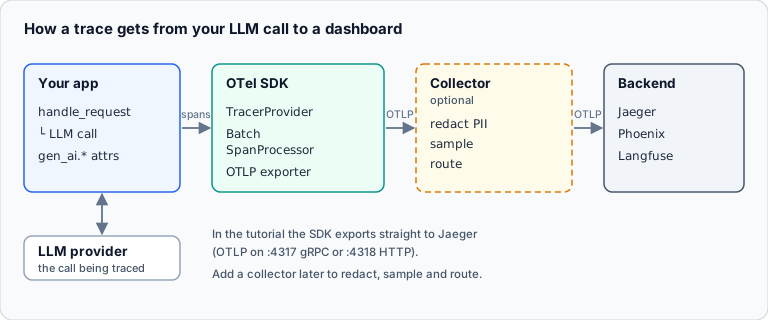
You control the data. Collectors let you redact, drop or sample spans before they leave your network. That matters when prompts can contain personal data.
The trade-off. The GenAI conventions are still maturing, and generic backends don't understand prompts, token costs or evals out of the box. OTel is the plumbing, and you choose the viewing layer on top.
How OpenTelemetry Works for LLM Calls
OpenTelemetry (OTel) is the vendor-neutral standard for traces, metrics and logs. It has a set of GenAI semantic conventions: agreed names for the attributes of an LLM call, so any tool can read them.
The mental model
A trace is the story of one request. It's made of spans, each one a timed operation. Spans nest, so a parent request contains child calls.
For an agent answering a question, that looks like this:
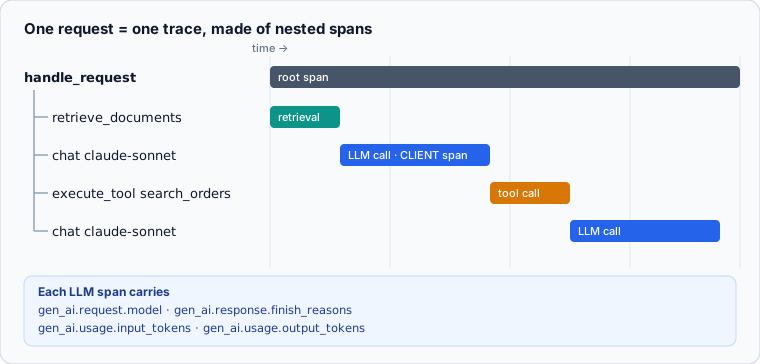
Each LLM call is one CLIENT span, named after the operation and model, for example chat gpt-4o-mini.
What goes on an LLM span
The GenAI conventions define attributes such as:
| Attribute | What it holds |
|---|---|
gen_ai.operation.name |
chat, text_completion, ... |
gen_ai.provider.name |
Which provider served the call |
gen_ai.request.model / gen_ai.response.model |
Model you asked for vs. the one that answered |
gen_ai.usage.input_tokens / output_tokens |
Token counts |
gen_ai.response.finish_reasons |
stop, length, tool_use, ... |
gen_ai.response.id |
The provider's ID for the response |
Agent and tool spans add attributes like gen_ai.agent.name and gen_ai.tool.name. There are also two metrics: gen_ai.client.token.usage and gen_ai.client.operation.duration.
Prompts and responses are opt-in
The conventions treat message content as opt-in, and for good reason. Prompts often contain user data. Capture content in dev and on sampled traffic, and keep it off or redacted elsewhere. Many instrumentation libraries gate this behind a setting, such as OTEL_INSTRUMENTATION_GENAI_CAPTURE_MESSAGE_CONTENT.
What instrumenting a call looks like
Instrumentation libraries do this for you, but the idea is simple. You open a span before calling the provider, then fill in the attributes from the request and the response:
- Before the call: set the operation, provider and requested model.
- After the call: set the response model, response ID, input and output tokens and finish reason.
- On failure: record the error on the span, so failed and retried calls show up in the trace.
Add your own attributes for things the standard doesn't cover yet, like the prompt template ID and version.
Context propagation
When a request crosses services (your app, an LLM gateway, a tool server), each hop must forward the W3C traceparent header. If a gateway strips it, the trace breaks and you lose the provider-side timing. Pair the trace ID with a business-level correlation ID that you can safely show to users and support.
A note on stability
The GenAI conventions are still evolving. Sources disagree on whether they've been declared stable, and attribute names have changed (gen_ai.system became gen_ai.provider.name). Check the official spec and pin your instrumentation versions.
Getting Started: Your First OTel Trace
Here's the shortest path to seeing an LLM call as a trace. You'll need Python and Docker.
Step 1: Install the SDK and exporter
Install the OpenTelemetry Python SDK and the OTLP exporter (opentelemetry-sdk and opentelemetry-exporter-otlp), alongside your provider's SDK.
Step 2: Start a trace backend
Run Jaeger's all-in-one Docker image. It accepts OTLP and gives you a UI at http://localhost:16686. Port 4317 receives OTLP over gRPC and 4318 over HTTP.
Step 3: Configure OpenTelemetry once at startup
Create a tracer provider with a service.name so your app is easy to find in the backend. Attach a batch span processor with an OTLP exporter pointing at localhost:4317, then register the provider globally. The batch processor sends spans in the background, so tracing doesn't slow your calls.
Step 4: Wrap an LLM call
Open a parent span for the request, such as handle_request, and make your instrumented LLM call inside it. The LLM span then nests under the request automatically.
Step 5: Look at the trace
Run your app, pick your service in Jaeger and open the trace. You should see the parent span with the chat ... span inside it, carrying the model, token counts and finish reason as attributes.
Step 6: Use auto-instrumentation
Once you have seen how it works, you rarely need to write these spans by hand. Instrumentation packages wrap the provider SDK and emit the attributes for you:
- The OpenTelemetry community maintains an OpenAI instrumentation package (
opentelemetry-instrumentation-openai-v2). - Projects like OpenLLMetry and OpenInference cover Anthropic and many frameworks.
Check each package's docs for its current status and the attributes it emits, since this area changes quickly. Turn on message-content capture only in environments where you're allowed to store prompts.
Next: add what the standard doesn't
Once the basics work, add a prompt template ID and version, a correlation ID, and cost to your spans. Those are what turn a trace from a timing view into a debugging tool.
Where to Send Your Traces: Backend Options
OTel gives you the instrumentation. You still need somewhere to send the data. Here are three starting points, from lightest to most integrated.
Option 1: Arize Phoenix (fastest local start)
Phoenix is an open-source, OTel-native trace viewer that you can run on your laptop. It uses the OpenInference instrumentation packages, which are a related set of conventions for LLM spans.
- Good for: trying tracing today with no account and no infrastructure.
- Setup: run the Phoenix server, call
register(auto_instrument=True)in your app, and make an LLM call. - Trade-off: it's a debugging and evaluation tool first. Plan separately for long-term storage.
Option 2: Langfuse (tracing plus prompts and evals)
Langfuse is open source and self-hostable, with a managed cloud option. It combines tracing, prompt management and evaluation, and it can ingest standard OTel data.
- Good for: teams that want prompt versioning and eval scores next to the traces.
- Trade-off: it's one more system to run if you self-host.
Option 3: Plain OTel with your existing stack
Use the OTel SDK and an auto-instrumentation package for your provider, then send spans to the backend you already have, such as Jaeger, Grafana Tempo or your APM.
- Good for: keeping LLM calls in the same traces as the rest of your services.
- Trade-off: generic backends don't understand prompts, token costs or evals, so you build those views yourself.
Also worth a look
- LangSmith if you're already on LangChain or LangGraph.
- An LLM gateway if you want one place to capture every call across teams. Make sure it forwards
traceparent.
My suggestion
Start with Phoenix locally to see what a good trace looks like. Keep your instrumentation on OTel so the backend is swappable. When you need prompt versioning and team-wide dashboards, move to Langfuse or your existing APM.
Best Practices Checklist
- Instrument with OTel so you can change backends later.
- Record model, tokens, finish reason and cost on every call.
- Version your prompts and put the version ID on the span.
- Keep content capture opt-in, and redact PII before export.
- Keep all errors and slow traces. Sample the rest.
- Alert on cost spikes, latency and truncated responses.
- Forward
traceparentthrough every gateway and tool.
Wrapping Up
You can't debug what you can't see, and with LLMs the failures don't announce themselves. Traces turn "the model got it wrong" into a specific prompt, context and step you can fix.
Pick one of the options above and trace a single flow this week. The first time you open a trace and see the exact prompt behind a bad answer, you won't go back.