When you paste a screenshot into Claude Code and see the word "image" appear in the input box, the terminal hasn't rendered a picture. It's done something far more interesting — and understanding why explains the whole platform story of why paste works on Mac but breaks on Windows.
The misconception
Most developers assume image paste works like text paste: the terminal intercepts the clipboard content and streams it into the input field. That's completely wrong for images.
Terminals are fundamentally text-oriented. They deal in character streams — bytes that map to glyphs. Image data is binary, has no glyph representation, and terminals have no standard mechanism to display it inline (outside of exotic protocols like Kitty's graphics protocol or iTerm2's inline image spec, which Claude Code doesn't rely on).
The terminal is just a trigger surface. The actual image data never flows through it at all.
What actually happens, step by step
You press Ctrl+V (or Alt+V on Windows). Claude Code's TUI (terminal user interface) layer — built with a library like Ink or Blessed — intercepts this keystroke before the terminal's own paste handler fires.
Claude Code calls the operating system's clipboard API directly — not the terminal's paste mechanism. On macOS this is the NSPasteboard API via OSC 52. It reads raw binary image bytes straight from the clipboard memory.
The raw bytes are encoded to a base64 string entirely in Claude Code's process memory. Nothing is written to disk. The placeholder word "image" appears in the input box as a UI affordance — it's just a label, not the data.
When you press Enter, the base64 string is assembled into a structured JSON content block alongside your text prompt and sent to Anthropic's /v1/messages endpoint.
Anthropic's API receives the image block, tokenises the pixel data using a vision encoder, and Claude processes both the image tokens and text tokens together in a single context window.
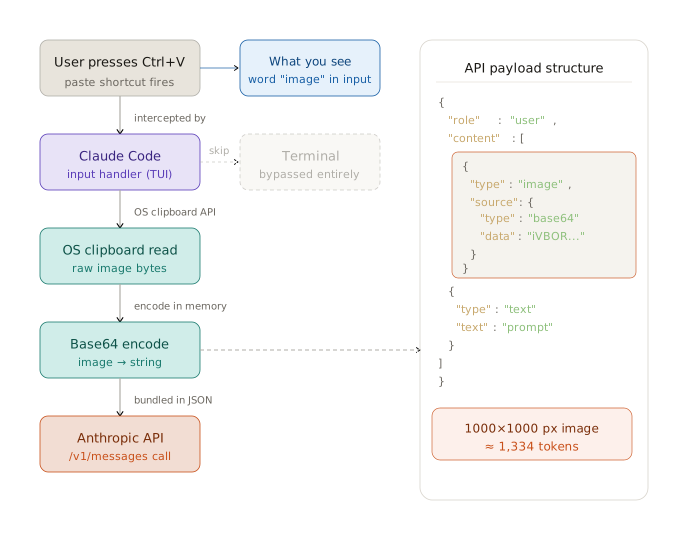
Fig 1 — How a paste event becomes an API call
The API payload structure
This is what gets sent to the Anthropic API when you paste a screenshot and type a prompt. The image and text are sibling items in the same content array:
{
  "role": "user",
  "content": [
    {
      "type": "image",
      "source": {
        "type": "base64",
        "media_type": "image/png",
        "data": "iVBORw0KGgoAAAANS..."
      }
    },
    {
      "type": "text",
      "text": "What's wrong with this layout?"
    }
  ]
}
The image is a proper first-class content block, not an attachment or a URL reference. It travels inline with the request as base64-encoded bytes. A 1000×1000 px screenshot costs roughly 1,334 tokens — a meaningful but manageable chunk of a large context window.
Why it breaks on Windows and Linux
The clipboard read relies on the terminal emulator cooperating with the OSC 52 escape sequence — a protocol that lets a terminal application read clipboard contents. The problem is image data.
Standard OSC 52 handles plain text only. It has no concept of MIME types, so when Claude Code asks the terminal "give me the clipboard", a Windows Terminal or PowerShell instance hands back nothing for binary image data — it simply doesn't know how to respond. The Kitty terminal created an extended protocol called OSC 5522 that adds MIME type awareness and supports images, but most terminals haven't adopted it yet.
On macOS the default terminal emulators handle this gracefully. On Windows and Linux, the terminal layer is the bottleneck — workarounds like AutoHotkey scripts or VS Code extensions bypass it by saving the clipboard image to disk and pasting the file path instead.
Platform shortcuts at a glance
Works natively. Terminal cooperates with the OSC 52 read.
Requires workaround or AutoHotkey script to save image and inject path.
Needs xclip (X11) or wl-clipboard (Wayland) installed and configured.
The elegant part
What makes this design clever is that Claude Code treats images as a first-class input type without requiring any changes to the terminal protocol. The terminal is used only as a keyboard event source. All the real work — clipboard access, encoding, API communication — happens in Claude Code's own process, completely independent of the terminal's capabilities.
This is why the word "image" appears instead of an actual preview: the terminal has no idea an image was pasted. Claude Code just told it to display a placeholder string. The bytes are already in memory, waiting to be sent with your next prompt.
Conclusion
Paste shortcut → Claude Code intercepts keystroke → OS clipboard API reads raw bytes → base64 encode in memory → show "image" placeholder in terminal → on Enter, send as a JSON content block to /v1/messages → Claude tokenises and processes it server-side. The terminal is never involved in the actual data transfer.