Someone told me recently that they'd asked claude.ai to "remember" something, then opened Claude Code the next day expecting it to already know. It didn't. They assumed a bug. There wasn't one — they'd just run into the fact that "Claude has memory" is three completely different claims depending on which product is in front of you.
There's the memory feature in claude.ai, a memory tool in the API for people building agents, and a memory system inside Claude Code itself. Same word, three storage mechanisms, three trigger conditions, three completely different places the data lives. None of them talk to each other.
The three systems, at a glance
| claude.ai memory | API memory tool | Claude Code memory | |
|---|---|---|---|
| Who it's for | People chatting on claude.ai | Developers building agents | People using Claude Code |
| Trigger | Automatic, in the background | Claude requests file ops; your app executes them | CLAUDE.md loaded at session start; auto-memory written as Claude works |
| Visible as a tool call? | No (background synthesis) — explicit "search past chats" is | Yes — every read/write is a tool call your code sees | No — files are read/written directly on disk |
| Storage | Anthropic-managed, encrypted at rest | Wherever your application puts it (you control the backend) | Plain files in the project: CLAUDE.md and a memory directory |
| Update cadence | Synthesized roughly every 24h, or immediately on explicit "remember X" | Whenever your agent decides to write | Whenever Claude decides something's worth keeping |
| Scope | Per Project (isolated), or a general pool outside Projects | Whatever the developer scopes it to | Per git repo |
Three different products, three different engineering problems. Let's take them one at a time.
claude.ai: background synthesis, not a searchable transcript
This is the one most people mean when they say "Claude remembers me." It's documented in Anthropic's help center, and it's actually two features that get conflated constantly:
Search past chats is retrieval — Claude goes and looks through your prior conversations when you ask it to recall something specific. You'll see this happen; it shows up as a visible tool call in the conversation.
Memory synthesis is different and much less visible. In the background, Claude periodically condenses your chat history into a summary, and that summary gets injected as context into new conversations — no searching, no tool call, just an ambient profile that's already there when you show up.
A few mechanics worth knowing:
- It updates within 24 hours of conversations being created, modified, or deleted — it's not instant unless you intervene.
- You can force an update immediately by telling Claude directly what to remember ("remember that I prefer—"). That bypasses the synthesis cycle entirely.
- Projects are isolated. Each Project gets its own memory space and its own summary, separate from your other Projects and from chats outside any Project. Start a new Project, get a blank slate.
- Incognito chats are excluded entirely — not summarized, not searchable, on any plan tier.
- Deleting a conversation removes it from what gets synthesized going forward.
- Memory data is encrypted at rest, tied to the underlying conversations it came from, follows your org's existing retention policy, and shows up in data exports.
- Enterprise admins can disable synthesis org-wide — doing so deletes existing synthesis data for everyone in the org. If it's left enabled at the org level, individual users retain control over their own settings unless the org has overridden that.
The thing to internalize: this isn't Claude re-reading your chat history at request time. It's a standing profile, rebuilt periodically, sitting there before you type your first message.
The API memory tool: memory as a file system you control
This one has nothing to do with claude.ai's consumer feature, despite sharing a name. It's documented on the Claude Platform docs as a tool for developers building their own agents.
The design point is just-in-time context, not automatic synthesis. Instead of loading everything relevant up front, Claude writes what it learns to memory files, and reads them back later, on demand — the same instinct behind why you don't load an entire codebase into context before writing one function.
The part that surprises people who assume this works like claude.ai's memory: it's entirely client-side. Claude doesn't have a storage backend of its own here. It requests file operations: create, read, update, delete. Your application executes them against whatever storage you've wired up. Files live under a /memories path prefix that you define; Claude never touches a disk or database directly.
Two practical consequences:
- It's designed to pair with context compaction. In a long-running agent session, compaction keeps the active context window small by summarizing old turns away — but a summary can lose specifics. Memory is the safety valve: the things that must survive compaction get written to a memory file first, so they're still retrievable after the compaction happens.
- It's eligible for Zero Data Retention (ZDR) arrangements, because Anthropic never stores the memory content — you do.
If claude.ai's memory is "a profile Anthropic maintains about you," this is "a scratchpad Claude writes to that lives entirely on your infrastructure."
Claude Code: two systems wearing one name
This is the one I actually use every day, and it's worth separating into its two halves because they behave completely differently — described in the Claude Code docs.
CLAUDE.md is instructions you wrote. It's loaded at the start of every session. Here's the detail that trips people up: the project-root CLAUDE.md gets re-read from disk after a /compact, but nested CLAUDE.md files in subdirectories don't auto-reload once the context has been compacted. If you're relying on a nested one, know that a mid-session compaction can silently drop it.
Auto-memory is the other half, and it's the one nobody explicitly writes. Claude decides, on its own, what's worth saving as it works — build commands that took three tries to get right, a debugging insight, a style preference you stated once. It's on by default, keyed to the project's git repo, and toggleable via /memory or the autoMemoryEnabled setting.
Here's what that actually looks like in practice, because this very post was written inside a repo that has auto-memory switched on. This project's memory directory has an index file and individual entries — here's the real index from this repo, unedited:
# Memory Index

- [project_panch_theme](./project_panch_theme.md) — New custom panch theme
  replacing Flex; warm paper design, all templates, design system CSS
- [seo_interactivity_revamp](./project_seo_interactivity_revamp.md) — JSON-LD,
  GA4, og_cards plugin, search/TOC/chips JS; YAML frontmatter converts in CI
  only, output/ tracked but stale
Each entry is its own file with frontmatter and a body — this is the actual seo_interactivity_revamp.md entry:
---
name: seo_interactivity_revamp
description: "July 2026 SEO + interactivity revamp — JSON-LD, GA4, OG cards
  plugin, search, TOC, chips"
metadata:
  type: project
---

SEO + interactivity revamp of the panch theme (July 2026)...

**Key constraints:**
- Posts are YAML frontmatter; CI runs scripts/convert_frontmatter.py before
  pelican. Local builds WITHOUT conversion get wrong slugs/no tags...
- Do NOT rename existing post slugs (published URLs; some use underscores).
Nobody wrote that file by hand. It got created because, in an earlier session, I'd explained a non-obvious constraint about this exact blog's build pipeline — and Claude decided that constraint was worth surviving past the end of that conversation. The next session, working on this post, started already knowing not to hand-write Pelican's colon-format frontmatter or rename existing slugs. That's the entire pitch for auto-memory: it's the difference between a compacted transcript (which can lose the specific "why") and a small, deliberately kept file (which doesn't).
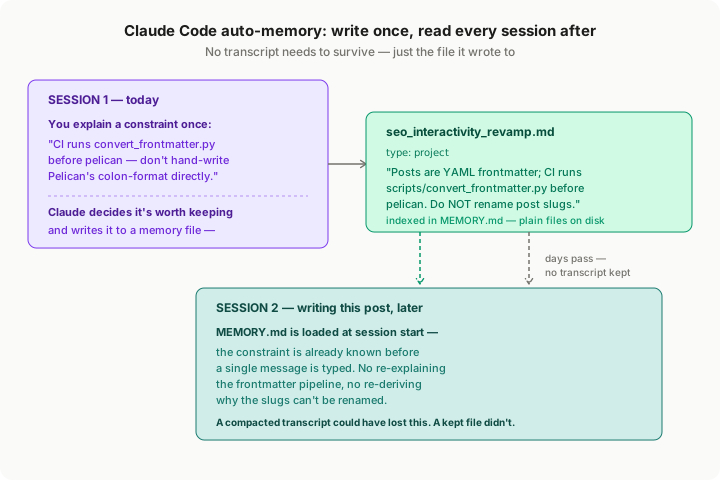
Fig 1 — Session 1 states a constraint once; Claude writes it to a memory file. Session 2, days later, starts with that file already loaded — no re-explaining required.
Three claims worth correcting
Researching this, I went through a stack of third-party write-ups on Claude memory, and a few recurring claims don't hold up against Anthropic's own documentation:
"Memory is only accessed when you explicitly prompt Claude." This undersells what's actually happening on claude.ai. Background synthesis runs automatically, roughly every 24 hours, with no prompting required — the summary is just there the next time you start a conversation. Explicit "remember X" is a way to force an update sooner, not the only way memory gets written.
A specific hard cap of "30 edits, 200 characters each" for explicit memory edits. This number shows up in at least one popular write-up, and it's precise enough to sound authoritative. It isn't backed by Anthropic's own documentation, and other sources give different numbers. If you're relying on a specific limit for something you're building, verify it in the current Settings UI rather than citing a blog post's number — including this one, since limits like this are exactly the kind of detail that changes without a docs update.
Treating CLAUDE.md-style file memory and claude.ai's synthesis-based memory as the same mechanism described from different angles. They're not. One is instructions you author that get loaded verbatim; the other is a profile Anthropic's models generate by summarizing your conversations. Conflating them makes both systems sound more magic, and less predictable, than they are.
Which one applies to what you're doing
If you're chatting on claude.ai and want Claude to remember your preferences across conversations without doing anything — that's memory synthesis, and it's already running.
If you're building an agent and need it to retain specific facts across a long session or past a context compaction, without Anthropic hosting that data for you — that's the memory tool, and you own the storage.
If you're using Claude Code and want to stop re-explaining the same project quirks every session — that's CLAUDE.md for the things you want stated explicitly, and auto-memory for the things you'd rather Claude notice on its own.
The short version
Three products, one word, zero shared plumbing. claude.ai builds you a profile in the background. The API memory tool hands you a set of file operations and gets out of the way. Claude Code splits the difference — instructions you write, plus notes Claude takes without being asked. Knowing which one you're actually touching is most of what you need to reason about what it will and won't remember tomorrow.