I built a small dashboard to track my Claude Code usage. Nothing fancy — just a localhost app that reads session data and surfaces token stats. I left it running for a couple of months and forgot about it.
Then I looked at the numbers: 1.83 billion cache read tokens across 65 days.
For context, my actual input tokens — the prompts I typed — were 2.93 million. The cache was serving roughly 625 tokens for every 1 token I wrote.
That ratio made me stop and actually think about what was happening. And it turns out, most of it has nothing to do with any configuration file I set up.
The misconception about prompt caching
If you've read about Claude's prompt caching, the common advice is: write a CLAUDE.md, put your project context there, and the cache will handle the rest.
That's not wrong, but it's missing the bigger picture.
I don't have CLAUDE.md files in most of my projects. Yet one session — 230 turns, nearly 3 hours of work on one of my projects — ran on a total of 354 input tokens. That's 1.54 tokens per turn on average. "ok", "yes", "go", "continue". Those were my messages for most of that session.
The cache was doing all the heavy lifting. And it wasn't because of any config file.
What's actually inside every Claude Code API call
Every time you press Enter in a Claude Code session, a structured JSON payload goes to Anthropic's API. Most developers assume it's just: system prompt + your message. It's a lot more than that.
Here's what's actually in that payload, in order:
1. The system prompt — Claude Code's built-in instructions, tool definitions (bash, read, write, edit, glob, grep...), safety rules, and runtime behaviour. This alone is 40,000–60,000 tokens before you type a single character.
2. Conversation history — every message and tool call from this session, going all the way back to turn 1. By turn 50, this has grown substantially. By turn 200, it's massive.
3. Your new message — what you just typed. Often 5–50 tokens.
Technically, file contents aren't a separate layer — they come back as tool results inside the conversation history. But the effect is the same: once Claude reads your package.json or a component file, that content sits in the conversation, becomes part of the stable prefix, and gets cached from that point forward.
The first two layers are what the cache stores. Your message is always fresh.
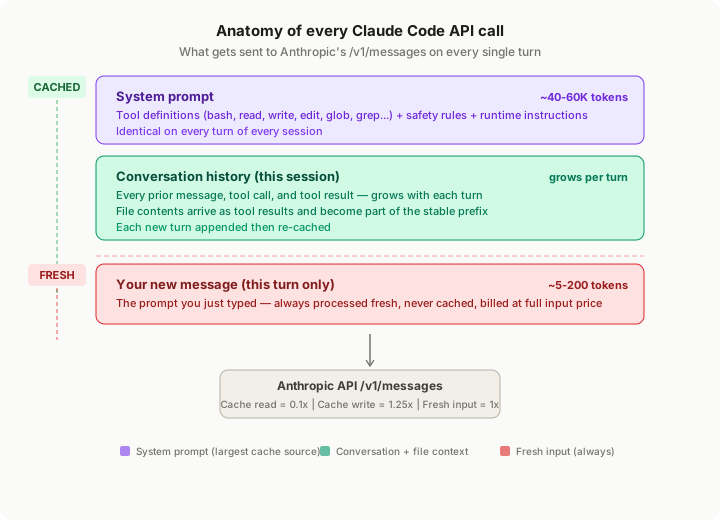
Fig 1 — The layered structure of every Claude Code API call. Green = cached, red = always fresh.
To know more about Claude's architecture, read my friend's blog on it.
Why cache reads cost ~1/10th of regular input
Anthropic has three pricing tiers for tokens going into the model:
- Fresh input — processed from scratch, full price (1×)
- Cache write — the first time a prefix is stored, slightly more expensive (~1.25×) because you're paying to create the snapshot
- Cache read — every subsequent time that snapshot is used, about 0.1× the fresh input price
Cache reads are roughly 10× cheaper than processing the same tokens fresh. One thing to know: the cache has a 5-minute TTL. If you step away from your session for more than 5 minutes between turns, the cached prefix expires and the next turn pays the full write cost again. For most active coding sessions this doesn't matter — you're hitting Enter well within that window. But it explains why slow, sporadic sessions sometimes show worse cache numbers.
Here's why that ratio matters at the scale of real sessions. In one of my longer sessions — 7h 50m, 387 turns on one of my projects — by the final turn Claude was reading 226,000 tokens per turn from cache. If those same tokens had been processed as fresh input every turn, the cost would be roughly 10× higher — for every single turn past the first few.
The compounding math is what makes this interesting. A cache write is a one-time slightly elevated cost. But a 387-turn session means that initial write gets amortised across 386 subsequent turns of cheap reads. The longer the session, the better the economics.
This is also why cache writes spiking occasionally isn't bad news — it just means Claude read a new file into context, and every turn after that reads that file for ~1/10th the cost.
You don't need CLAUDE.md to cache well
Let me show you one session in detail — I'll call it the "short session".
This one ran for 2 hours and 57 minutes on one of my projects. 230 assistant turns. And 354 total input tokens — across all 155 of my messages combined.
The per-turn data is striking:
avg_input_tokens:
  turns 1–10:    2.4 tokens
  turns 50–100:  1.55 tokens
  turns 200+:    1.65 tokens
Every single turn had between 1 and 3 input tokens. That's not a bug. That's just the role/turn overhead the API adds automatically. My actual typed content was essentially nothing after the opening prompt. "ok". "yes". "next". That's it.
25.6 million cache read tokens served a 3-hour coding session from a context I loaded once.
The cache source wasn't a CLAUDE.md. It was: - The system prompt (loaded at turn 1, cached immediately) - The source files Claude read as it worked (each one added to the stable prefix) - The conversation history accumulating turn by turn
All of that happens automatically. The only prerequisite is that the stable prefix needs to be at least 1,024 tokens before caching kicks in — but with a system prompt that's 40–60K tokens on its own, you clear that threshold before you even type your first message.
CLAUDE.md would just add a project-specific prefix that persists across sessions too — useful, but not the primary driver of what you're seeing.
The cache ramp curve
Here's what the per-turn cache read volume looks like as the long session progresses:
| Turn | Cache reads/turn | Notes |
|---|---|---|
| 10 | 24,708 | Session just starting |
| 50 | 42,190 | A few files read in |
| 100 | 67,184 | Context expanding |
| 200 | 108,116 | Well into agentic work |
| 300 | 180,291 | Large files loaded |
| 387 | 226,411 | Near-full context window |
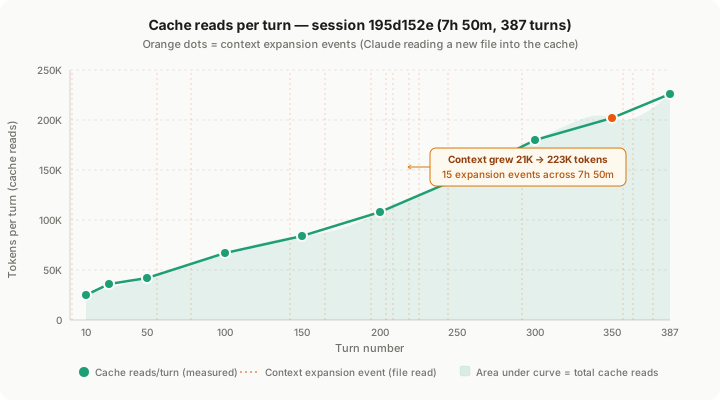
Fig 2 — Each orange dot is Claude reading a new file into context. After each spike, the per-turn cache read grows because that file is now part of every subsequent turn's stable prefix.
The ramp isn't smooth because context doesn't grow smoothly. It grows in discrete jumps — every time Claude reads a file, the context size increases, and every subsequent turn pays the cache-read price on that larger context.
There were 15 context expansion events across this 7h 50m session. The context grew from 21K tokens at turn 1 to 223K tokens by turn 376. That's 10× growth, with every byte after the initial write costing about 1/10th to serve.
When wiping is better than grinding
The short session had something unusual in the data: at turn 80, cache reads dropped to zero.
{
  "turn": 80,
  "cache_write_tokens": 82269,
  "cache_read_tokens": 0,
  "note": "full context rebuild — /clear or SYSTEM_PROMPT re-init"
}
A mid-session /clear. The entire context was wiped and rebuilt from scratch — jumping from ~53K to 82K tokens in a single write event.
Here's what's interesting: the session's overall cache efficiency — cache_read_tokens / (cache_read + cache_write + input) — was 94%. That's higher than the 7h 50m session. The reset didn't hurt the session — it probably helped. The first 80 turns had accumulated some drift, some context that wasn't useful anymore. The wipe gave Claude a clean slate with a fresh, compact context, and the ramp after turn 80 was steeper and smoother with only 5 total expansion events for the rest of the session.
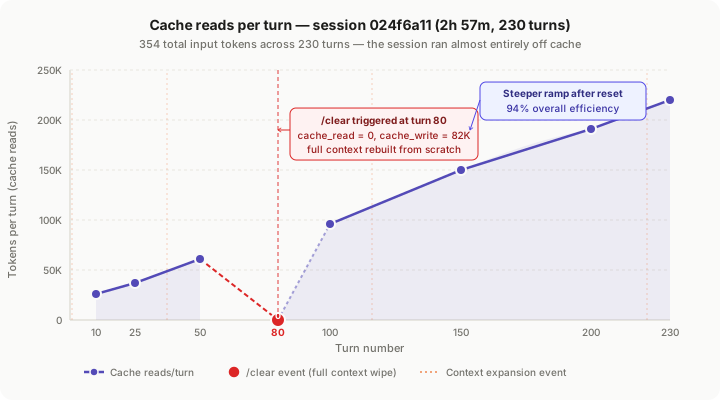
Fig 3 — The dip to zero at turn 80 is a deliberate context wipe. Recovery is rapid because the rebuilt context is denser and better structured.
The technique this suggests: if a session starts drifting — Claude losing track of what it was doing, asking clarifying questions it should already know the answer to, repeating itself — a /clear with a compact handoff prompt is often better than grinding forward. You lose some accumulated history, but you gain a sharper, more focused context to work from.
What your prompt style reveals
Two sessions, completely different working styles, both healthy:
The short session — 2.3 tokens per user message. The opening prompt was specific enough that Claude could run autonomously for 230 turns on single-word confirmations. This is what agentic Claude Code usage is supposed to look like. You set up the task clearly, then you supervise.
A third session I sampled — 47.5 tokens per user message. More directive prompts throughout. Not a worse session — just a different mode. More explicit instructions per turn produced a 97.1% cache efficiency, the highest of any session I analysed. Longer, more specific prompts meant fewer clarification loops, which meant the cache prefix stayed stable longer between writes.
Neither pattern is wrong. The thing to watch is the ratio of output to input. The short session had a 162× output-to-input ratio — Claude produced 162 tokens for every 1 token I wrote. That's the signature of a well-bootstrapped agentic session where the work is doing itself.
Three things worth watching in your own usage
1. Cache efficiency below 80%
This usually means one of: you're starting lots of short sessions (cold starts dominate), your context is changing rapidly within sessions (lots of file switching, scope changes), or you're hitting the 5-minute cache TTL between turns in a slow-moving session (the cache expires if you don't send another message within that window). The fix is usually longer sessions with tighter scope.
2. Context expansion events clustering late in a session
In the long session, expansion events started bunching together after turn 200 — every 5–10 turns instead of every 30–50. This is a sign the task scope kept growing rather than being well-defined upfront. The session still worked fine, but a more bounded opening prompt would have produced a flatter ramp and fewer surprise file reads late in the session.
3. The ramp curve shape as a health indicator
A healthy session looks like a smooth upward slope — cache reads growing steadily as context accumulates. A session in trouble looks like a flat line that never climbs, or a line that plateaus early and stops growing. Flat means Claude isn't reading files (pure conversation, not much work being done). Early plateau often means Claude Code compacted the context — it automatically summarises older conversation history when approaching the context window limit — and you're in a loop where the summarised context keeps getting re-cached at roughly the same size.
The short version
Here's what's actually happening when Claude Code shows you a high cache efficiency number:
Every API call sends the same 40–60K token system prompt. Every turn adds to the growing conversation history. Every file Claude reads joins the stable prefix. All of that gets cached automatically, and every subsequent turn reads it at roughly 1/10th the cost of processing it fresh.
You don't need to configure this. You just need to stay in sessions long enough for the ramp to build.
The 1.83 billion cache read tokens I accumulated over 65 days weren't from any clever setup. They were from 1,142 sessions of Claude Code doing what it does — reading files, accumulating context, and serving it back turn after turn at a fraction of the input cost.
The best thing you can do to improve your cache numbers is also the simplest: start sessions with a specific, well-scoped opening prompt and let Claude run.
All session data in this post is from a local token tracker I built for my own Claude Code usage. I sampled a few high-usage sessions to illustrate the patterns. Token counts are real; model used across all sessions analysed was claude-opus-4-6.