Whether you're building an AI chatbot or just curious about how ChatGPT, Claude, or Gemini works — understanding what happens behind the scenes will change how you think about these tools. Let's trace a single request from start to finish.
1. The Big Picture
Imagine a simple chat app — it could be a web app on your laptop or a mobile app on your phone. You type a message and press Send. What happens next involves your device, a server your developer built, and a powerful AI model running somewhere in the cloud.
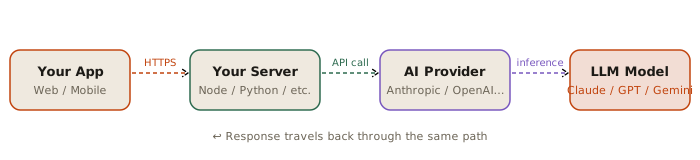
Fig 1 — The full request/response journey
Notice that your app never talks directly to the AI model. It talks to your server, which holds the API key and is responsible for calling the AI provider. This keeps your credentials safe and lets you add logic like rate limiting, caching, or user auth.
Why the middle server? If your app called the AI API directly from the browser, anyone could inspect the network request and steal your API key. The server acts as a secure middleman.
2. The Request: What Gets Sent to the AI
When your server calls the AI provider's API, it sends a structured object — think of it as a carefully filled form. There are four essential fields every request needs:
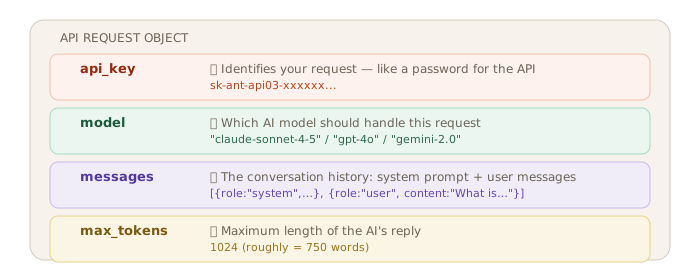
Fig 2 — The four essential fields in every AI API request
The most important field is messages. It's an array (a list) of conversation turns. Each turn has a role — either system, user, or assistant — and the actual text content. This structure lets the model understand the full context of a conversation, not just the latest message.
3. Inside the AI: What the Model Does
Once the request arrives at the AI provider, the model processes it through four stages. These happen in sequence, faster than you can blink.

Fig 3 — The four processing stages inside any LLM
Stage 1 — Tokenization: Breaking Text into Pieces
The model can't read text the way humans do. First, it breaks your message into small chunks called tokens. A token is roughly a word or part of a word. The sentence "What is quantum computing?" becomes five tokens:
Fun fact: Longer words sometimes become multiple tokens. "Tokenization" →
Token+ization. This is why the AI API charges you for "tokens" not "words" — it's a more precise unit.
Stage 2 — Embedding: Converting to Numbers
Computers only understand numbers. So each token is converted into a long list of numbers called an embedding — like GPS coordinates but in a 1000-dimensional space. Words with similar meanings end up with similar coordinates. This is how the model "knows" that "dog" and "puppy" are related.

Fig 4 — Each token maps to a vector of numbers that encodes its meaning
Stage 3 — Contextualization: Understanding the Full Picture
This is where the real magic happens. The model looks at all the token embeddings together and figures out how they relate to each other. In the sentence "I went to the bank", does "bank" mean a financial institution or a riverbank? Context solves this. The model pays different amounts of "attention" to different tokens — a mechanism literally called self-attention.
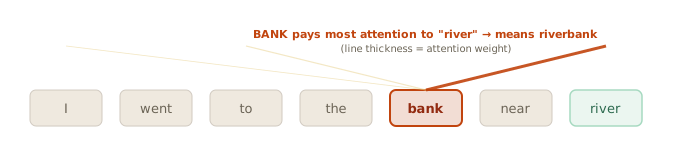
Fig 5 — The attention mechanism: "bank" looks at surrounding tokens to find its meaning
Stage 4 — Generation: Writing One Token at a Time
Now the model writes a response. But here's the surprising part: it generates one token at a time. Each token it writes is added to the context, and then it predicts the next token, and so on. It's like autocomplete, but extraordinarily sophisticated.
The EOS token (End of Sequence) is a special token the model has learned to generate when it's done. This is one of three ways generation can stop.
4. When Does Generation Stop?
The model doesn't just run forever. There are exactly three conditions that stop it:
The hard cap you set was hit. The response is cut off — watch for incomplete sentences.
The model decided it was done. This is the ideal stop — a clean, complete response.
A special marker you defined appeared. Useful for structured outputs and agent pipelines.
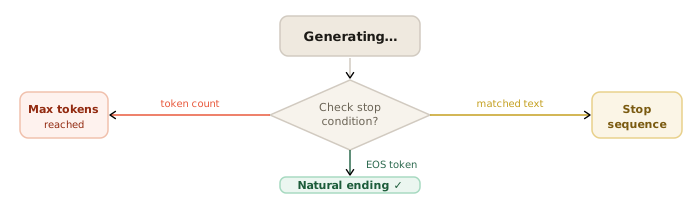
Fig 6 — The three paths that end generation
Practical tip: Always check
stop_reasonin your code. If it's"max_tokens", the response was cut off — you may want to increase your limit or handle the incomplete output gracefully.
5. The Response: What Comes Back
Once generation stops, the AI provider packages the output and sends it back to your server. The response object is clean and predictable — every provider returns roughly the same structure:
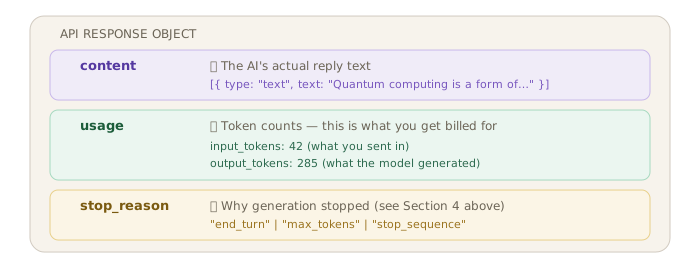
Fig 7 — The three key parts of every AI API response
Your server receives this response, extracts the content text, and sends it back to the user's app to display in the chat interface. The full round trip — from the moment you pressed Send — typically takes 1–5 seconds, though streaming APIs (which send tokens as they're generated) make it feel much faster.
Putting It All Together
Here's the entire lifecycle of a single chat message, from start to finish:
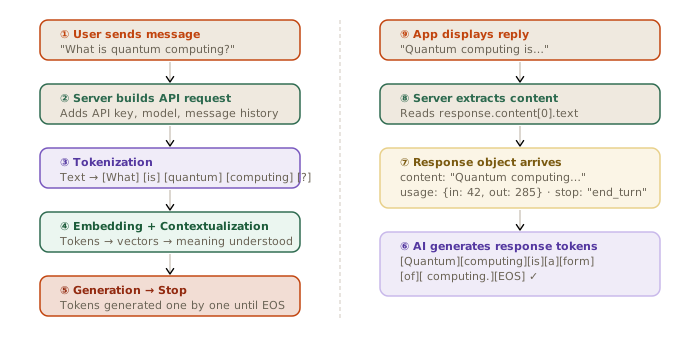
Fig 8 — Complete lifecycle of a single AI chat message
Key Takeaways
| Concept | What it is | Why it matters |
|---|---|---|
| Tokens | Pieces of text (≈ words) | Determines API cost and context limit |
| Embeddings | Numbers that encode meaning | How the model "understands" language |
| Attention | Focusing on relevant context | How models resolve ambiguity |
| max_tokens | Your output cap | Set too low → truncated responses |
| stop_reason | Why generation ended | Always check this in production code |